
Mobile app
EdTech
Product Designer
UX Research
User Flows
Design System
UX/UI Design
AI generations
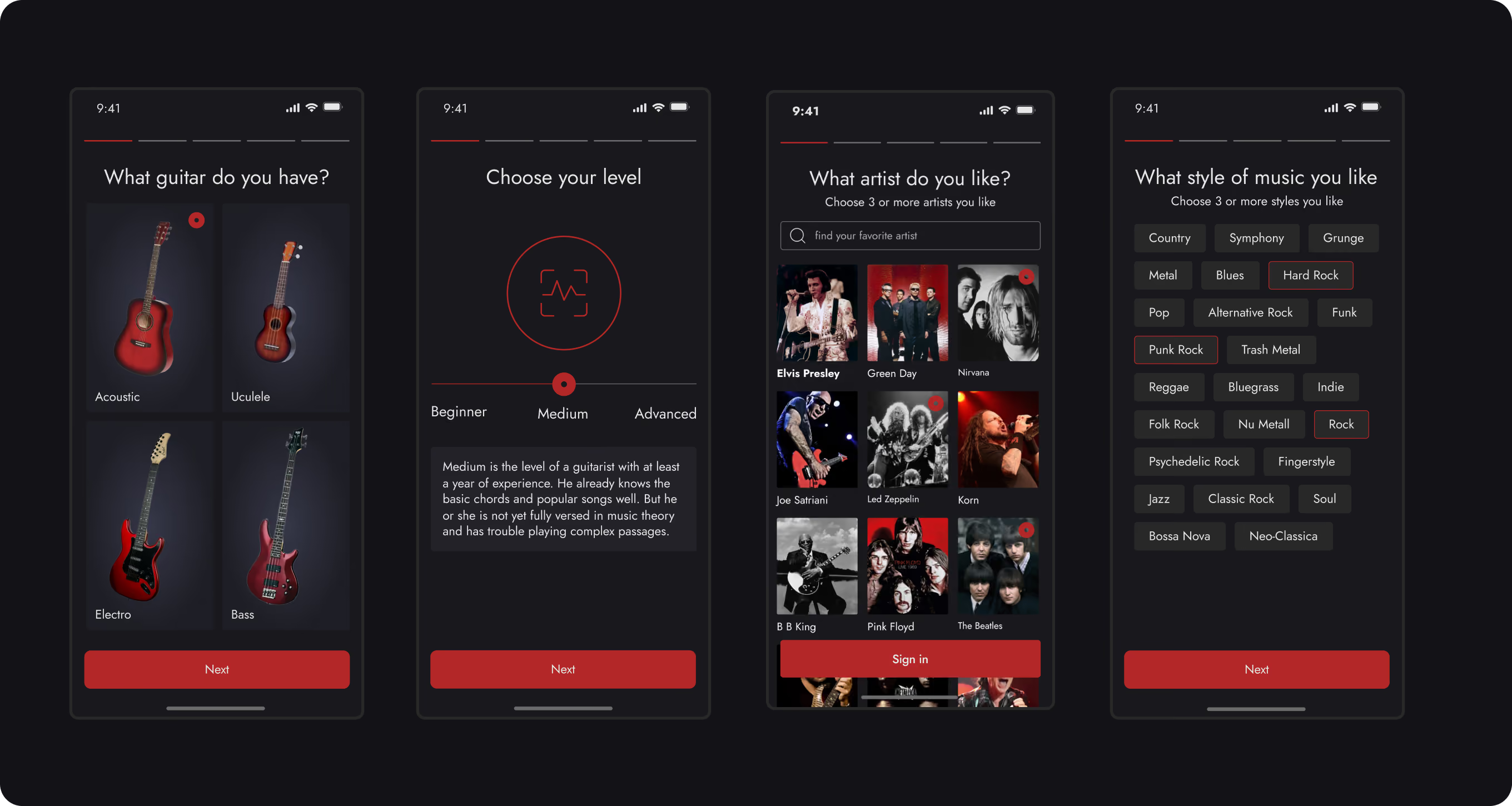
I designed a personalized onboarding experience that helps determine a user’s skill level, instrument type, and musical preferences to create a customized learning program. Instead of a one-size-fits-all approach, the app tailors the content to each student’s goals and interests, shortening the path to the first noticeable result.
• creation of a personalized learning path;
• adjustment of content difficulty to the user’s level;
• personalized delivery of lessons, chords, and songs;
• reduction in the amount of irrelevant material at the start of the learning process.
receiving a personalized learning plan from the very first time they launch the app, quick access to songs and exercises that interest them, and a more comfortable learning experience without having to search for suitable content on their own.
increased activation and onboarding completion rates, improved user retention through relevant content, greater engagement with the learning experience, and higher conversion to paid subscriptions thanks to a more personalized user experience.
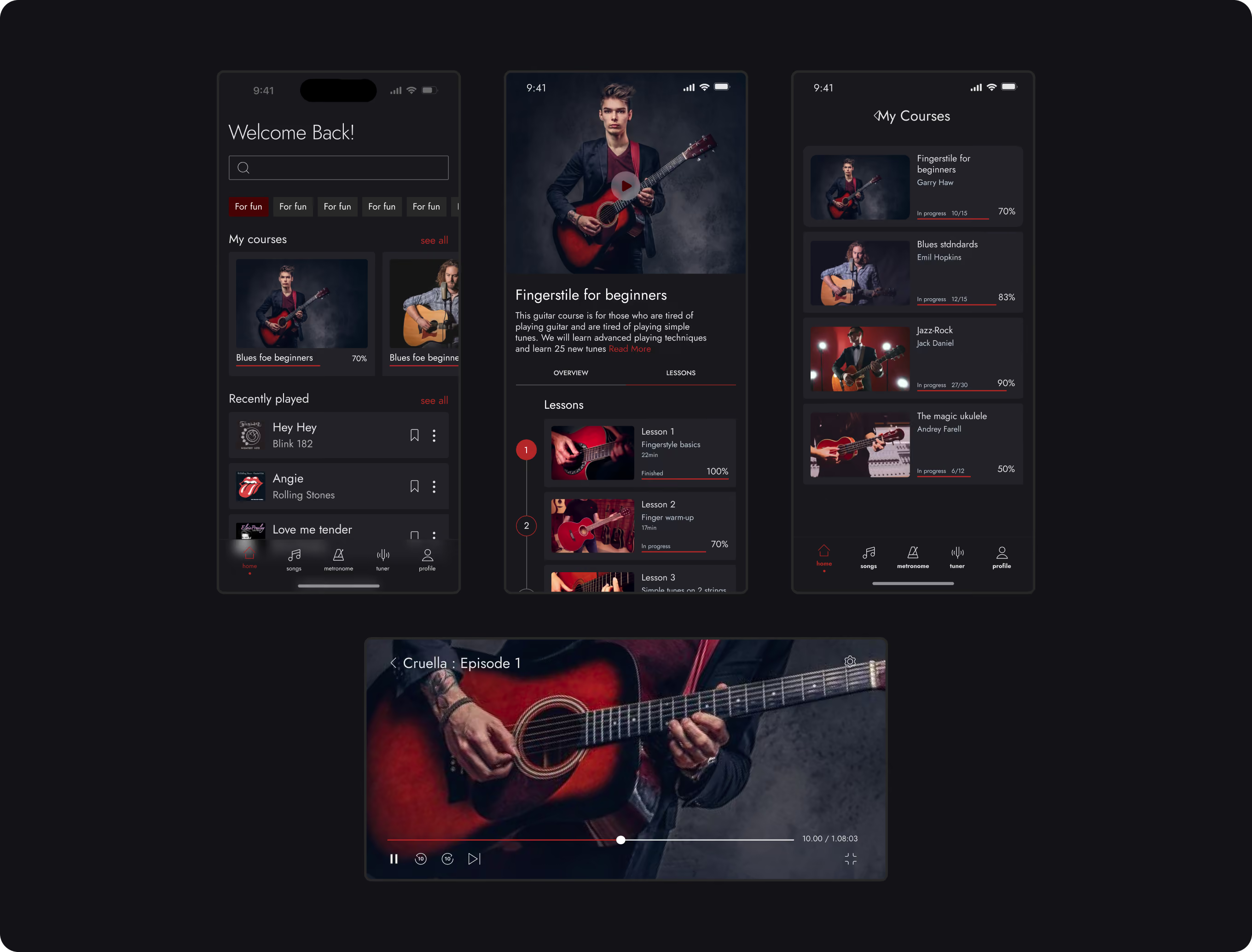
Home screen, which combines a marketplace for educational programs, personalized recommendations, and quick access to key learning scenarios. The screen serves as the main entry point to the product and helps users find suitable courses, continue their learning, and track their progress - all from a single interface.
• search by course, artist, and music genre;
• quick access to courses currently in progress;
• tracking of learning progress and completed lessons;
• recommendations for new courses and lessons based on user activity;
• a catalog of learning programs covering various playing styles and techniques.
the ability to quickly find relevant courses and lessons without a lengthy search, resume learning where they left off, and receive personalized recommendations tailored to their skill level and musical interests.
increased user engagement through personalized content, higher consumption of educational materials, improved retention thanks to convenient access to active courses, and the creation of additional monetization opportunities through the promotion of premium programs and subscriptions.
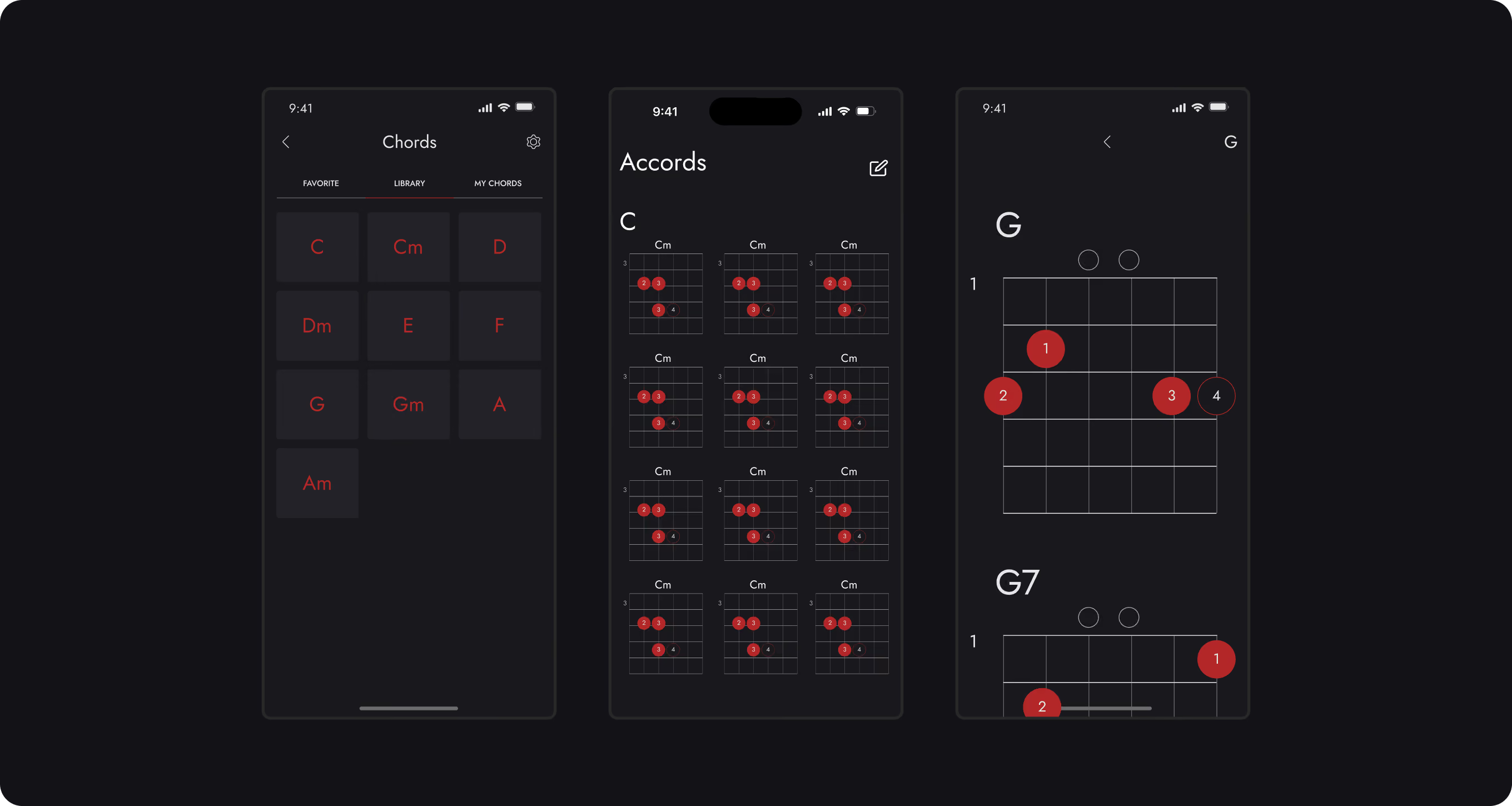
Interactive chord library that helps users learn new chords, quickly find the right fingerings, and improve their playing technique without having to rely on external resources. This section serves as both a reference guide and a practical tool, supporting users at every stage of their learning journey.
• saving favorite chords for quick access;
• grouping chords by category and difficulty;
• using chords in related lessons and songs;
• display of alternative ways to play a single chord;
• learning chords as part of a personalized learning program;
• visualization of fingerings with precise finger placement on the fretboard.
the ability to quickly learn new chords and reinforce acquired skills without switching between different apps and websites. Visual diagrams help users master proper fingering more quickly, and integration with lessons and songs makes the learning process more consistent and understandable.
increased user engagement through regular use of the knowledge base, longer time spent within the product, reduced reliance on external educational resources, and enhanced subscription value thanks to a comprehensive learning experience within a single platform.
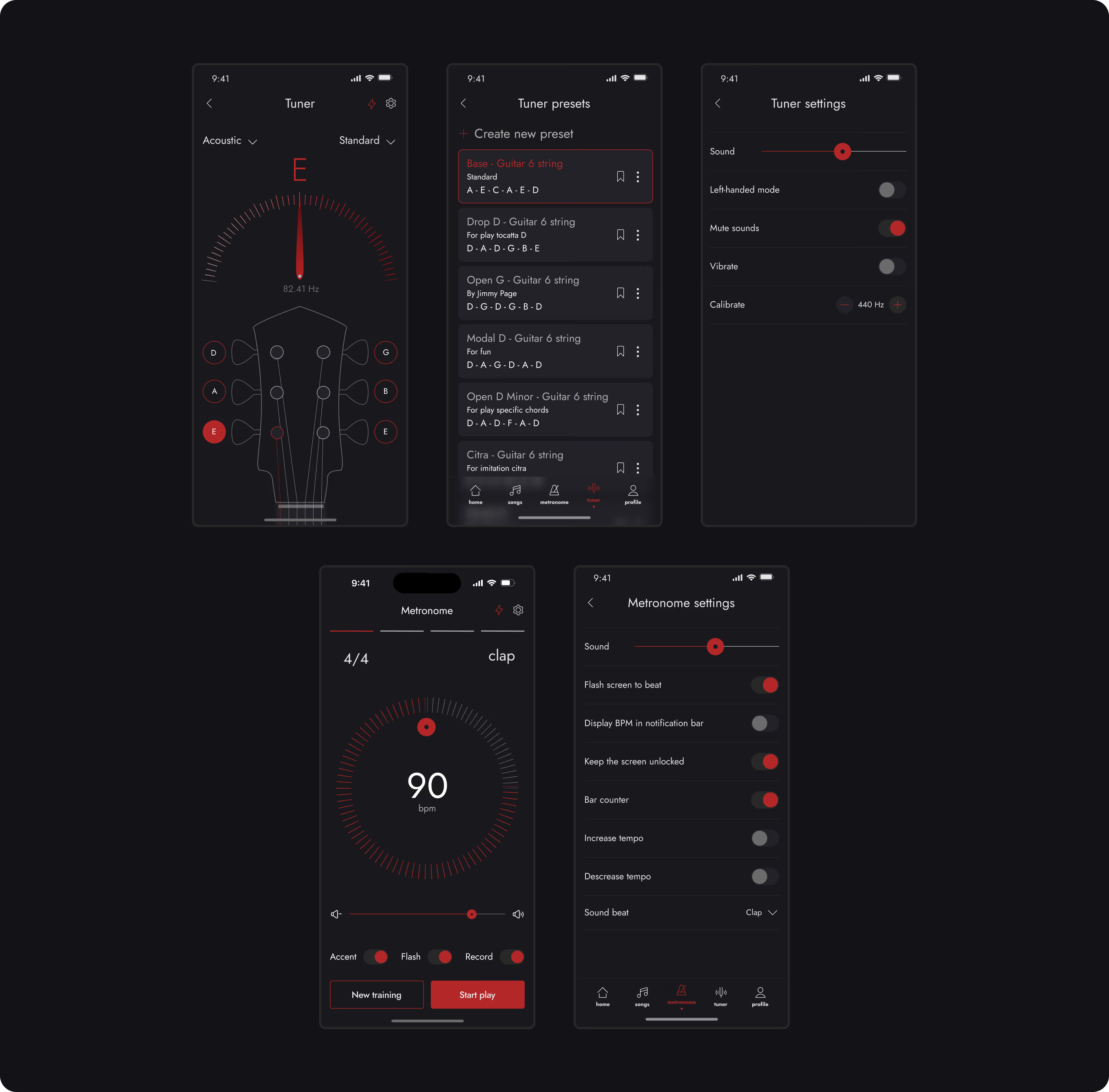
Set of built-in practice tools that help users tune their instruments and develop a sense of rhythm without having to use third-party apps. The metronome and tuner are integrated into a single learning process and are available at any time during practice sessions, which reduces distractions and makes practicing more convenient.
• saving custom tuning presets;
• visual indication of deviation from the target frequency;
• support for various guitar types and alternative tunings;
• a metronome with flexible tempo settings;
• visual and audio cues for rhythm practice;
• selection of time signature and beat accentuation;
• creation of personalized practice sessions for various exercises.
the ability to perform all basic practice tasks within a single app. Users don’t need to switch between the tuner, metronome, and instructional materials, which makes the practice process more convenient and helps them focus on developing their playing skills.
increased user engagement through regular use of the knowledge base, longer time spent within the product, reduced reliance on external educational resources, and enhanced subscription value thanks to a comprehensive learning experience within a single platform.
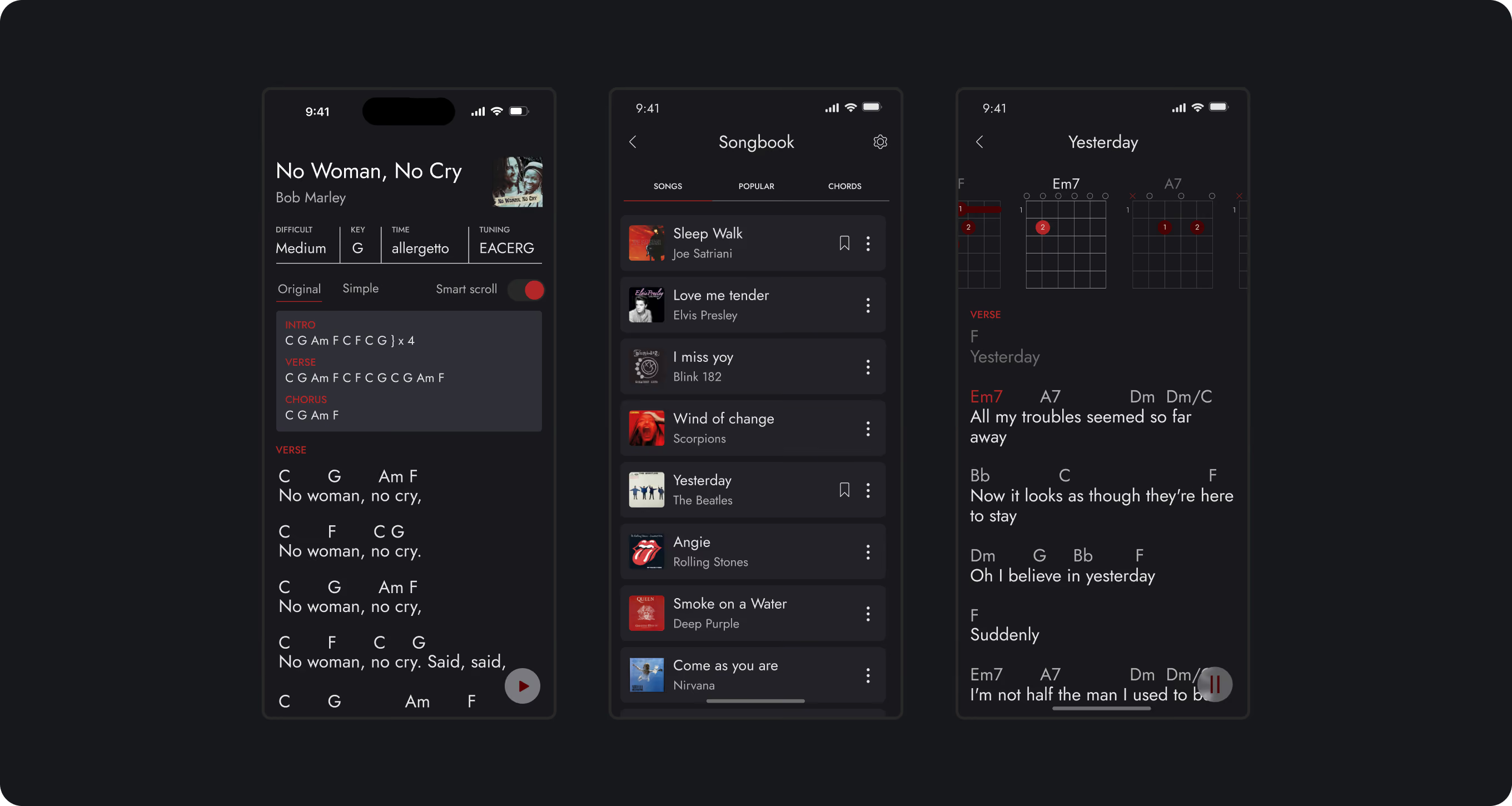
Song library that helps users put their newly acquired skills into practice by playing real songs. This section combines a song catalog, chords, lyrics, and an interactive play mode, allowing users to learn to play their favorite tracks at their own pace and gradually improve their skills.
To simplify learning, an interactive play mode has been implemented that synchronizes chords and lyrics in real time, helping users play a song without having to constantly scroll the screen manually.
• highlighting of active chords during playback;
• simplified display mode for beginner musicians;
• scroll speed control for a comfortable learning experience;
• synchronization of chords with the current point in the song;
• quick navigation between verses, choruses, and other sections of the song.
the ability to learn and play favorite songs within a single interface without relying on third-party tablature, websites, or reference guides. Interactive playback helps users focus on playing rather than searching for the right chords or manually scrolling through the lyrics, making the learning process more engaging and effective.
increased engagement through content that directly aligns with users’ interests; higher app usage frequency due to regular practice of favorite songs; improved retention through an emotional connection to the musical content; and the creation of additional monetization opportunities through premium song libraries, exclusive playlists, and advanced playback features.
The project’s main focus was on lowering the barrier to entry, simplifying the search for services, improving interaction between platform participants and laying the foundations for a scalable fitness marketplace.
Onboarding Completion Rate:
85%
Lesson Completion Rate:
80%
Average Practice Session:
20min
• Guitar Coach - analyzes your playing via the device’s microphone, automatically identifies mistakes, and provides personalized recommendations.
• Adaptive Learning Paths, dynamic adaptation of the learning program based on the user’s level, progress, and interests.
• Gamification System, daily tasks, achievements, streaks, and rewards for progress.
• Social Learning Features, music challenges, sharing achievements, and interacting with other students.
• Offline Learning Mode, the ability to download lessons, chords, and songs for practice without an internet connection.