
SaaS, Mobile App
B2B AI service, CRM System
Product Designer
UX Research
User Flows
Design System
UX/UI Design
for comprehensive management and control of business processes
for quick monitoring and decision-making on the go
• overloaded tables
• complex filters
• a large number of actions
• high cognitive load
However, the study showed that users interact with the product differently depending on the device
The main goal of the project was to rethink the traditional approach to CRM and create a system that helps business owners make decisions faster by leveraging AI capabilities and the strengths of each platform.
How can we distribute functionality among the platforms so that each one addresses its own specific task and does not duplicate the work of another?
How can you reduce the number of steps and screens without losing control over business processes?
How can we explain the actions of artificial intelligence to users and make automation predictable?
How can we maintain consistency between the web and the mobile app across different usage scenarios?
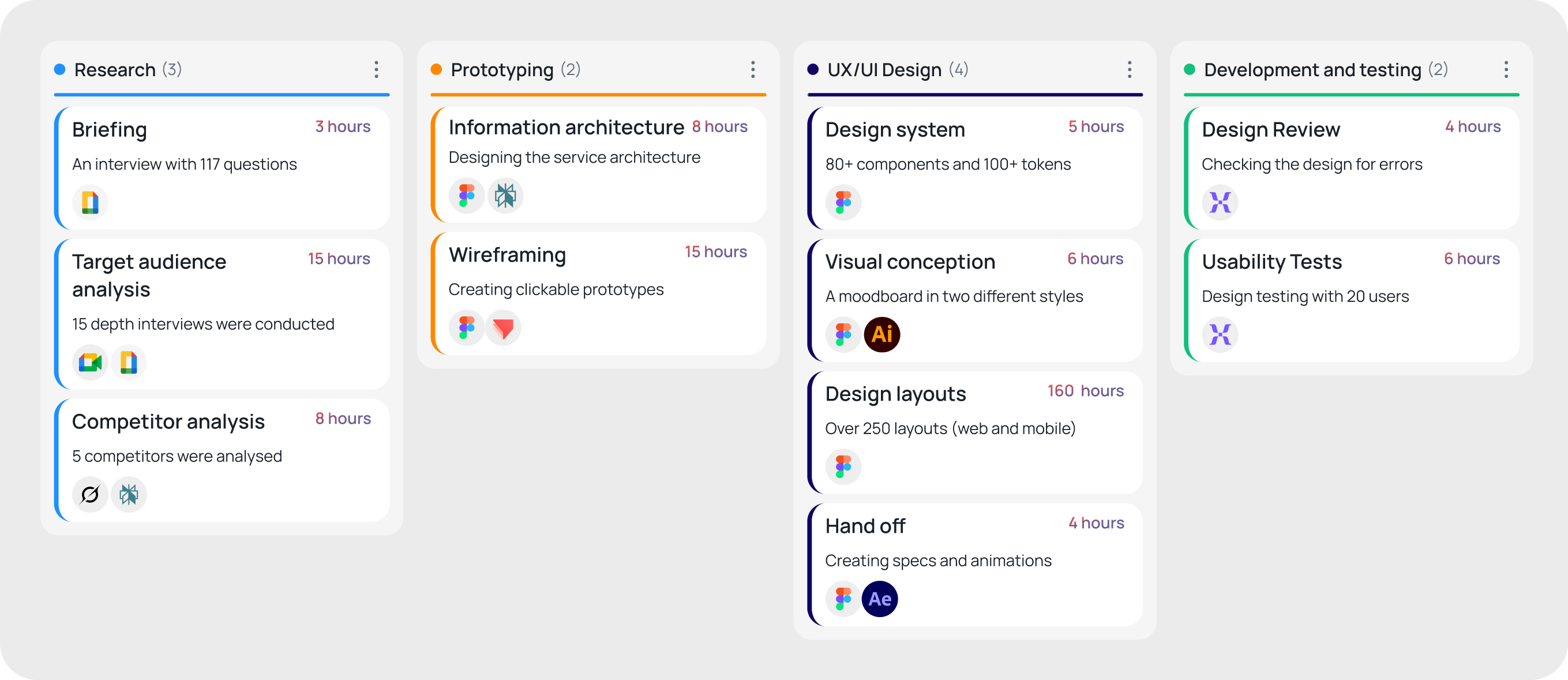
Key scenarios:
• Lead management
• Funnel management
• Customer management
• Analytics
• AI settings
• Automation
• Reports
For most entrepreneurs, experts and bloggers, this process is too complex and expensive.
Key scenarios:
• Quick business overview
• Monitoring AI actions
• Validating decisions
• Customer engagement
• Quick actions
3. Irregular postingMost content plans fall through due to the labour-intensive nature of production.
By dividing tasks between the web and the mobile app, users will be able to carry out their workflows more quickly without overloading the interface.
I have distributed the functionality between the platforms:
Web CRM — business management (complex processes)
Mobile CRM — monitoring and quick actions
• ↓ Cognitive Load
• ↑ Mobile Adoption
• ↑ Task Completion Rate
If we explain how AI works, users will have more trust in automation.
One of the main problems with AI products is the “black box” effect.
A separate AI Activity Feed has been created, where each action is accompanied by an explanation and available user actions.
• ↑ AI Approval Rate
• ↓ AI Override Rate
• ↑ User Trust
If you break down complex workflows into a few quick steps, users will be able to work with the CRM directly from their smartphones.
Most mobile interactions take place between meetings or while on the go.
The mobile version includes only the key actions:
• change status
• confirm entry
• send a message
• create a lead
• set a reminder
• ↑ Mobile Task Completion
• ↓ Drop-off Rate
• ↑ Daily Active Users
If you replace tables with visual business status cards, users will understand what’s going on more quickly.
For business owners, it’s important not to analyze data, but to quickly get answers to questions such as:
What’s happening right now?
Where are the problems?
What needs attention?
The home screen is organized around cards:
• new leads
• meetings
• AI actions
• critical events
• ↓ Time to Awareness
• ↑ Daily Engagement
• ↑ Decision Speed
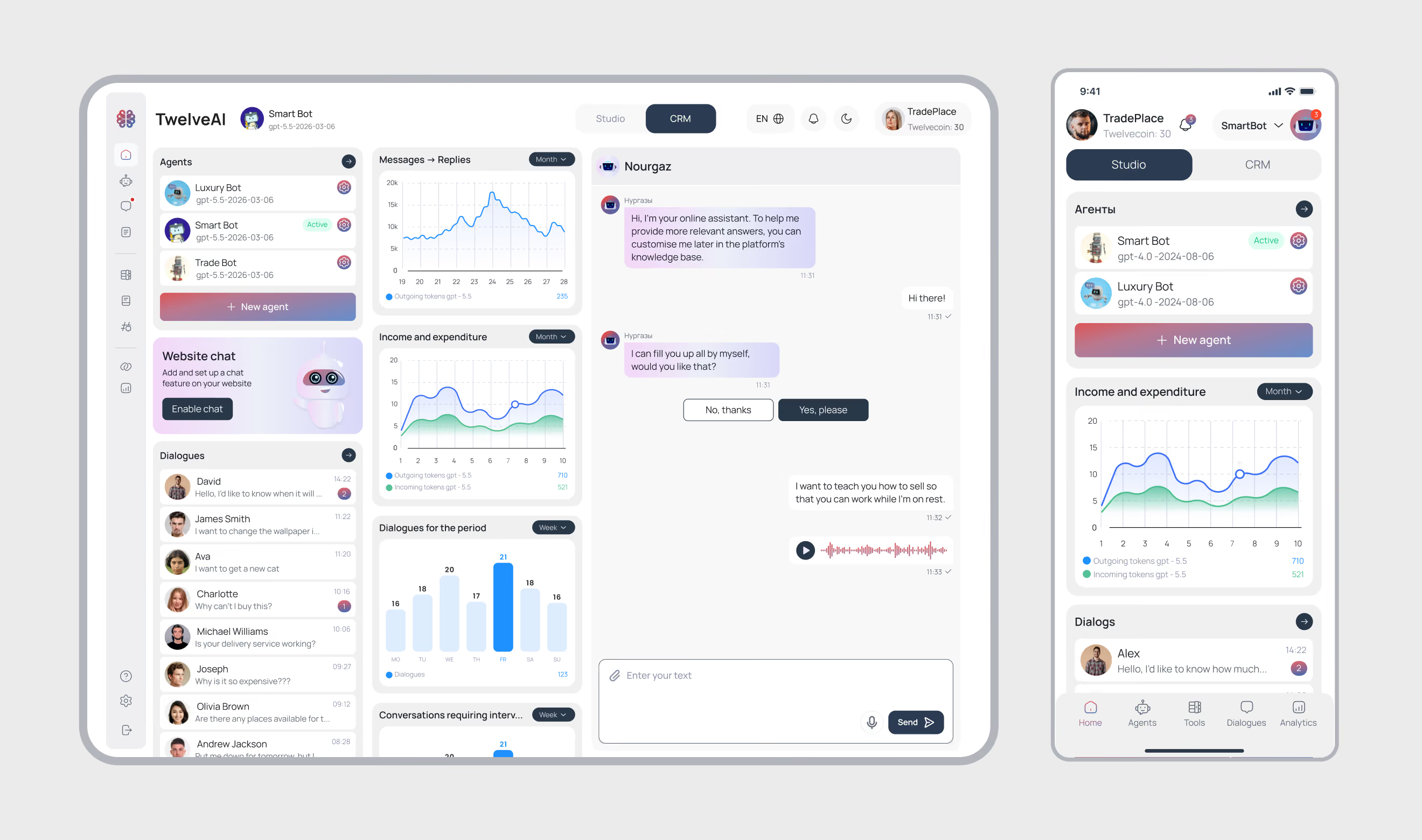
Unified platform control centre that helps business owners manage AI agents, track customer enquiries and analyse key company metrics from a single interface. The home screen serves as the starting point for all key workflows and provides quick access to the most important information.
• monitoring of financial and operational metrics;
• real-time overview of customer conversations;
• adaptation for web and mobile use cases;
• management of the AI agent ecosystem;
• monitoring of AI and sales team activity;
• quick access to CRM and analytics.
reduced cognitive load by consolidating key information in one place and the ability to make decisions without having to search for data across different sections of the system.
improved management efficiency, faster response to changes in business processes, and enhanced control over the entire customer communication funnel
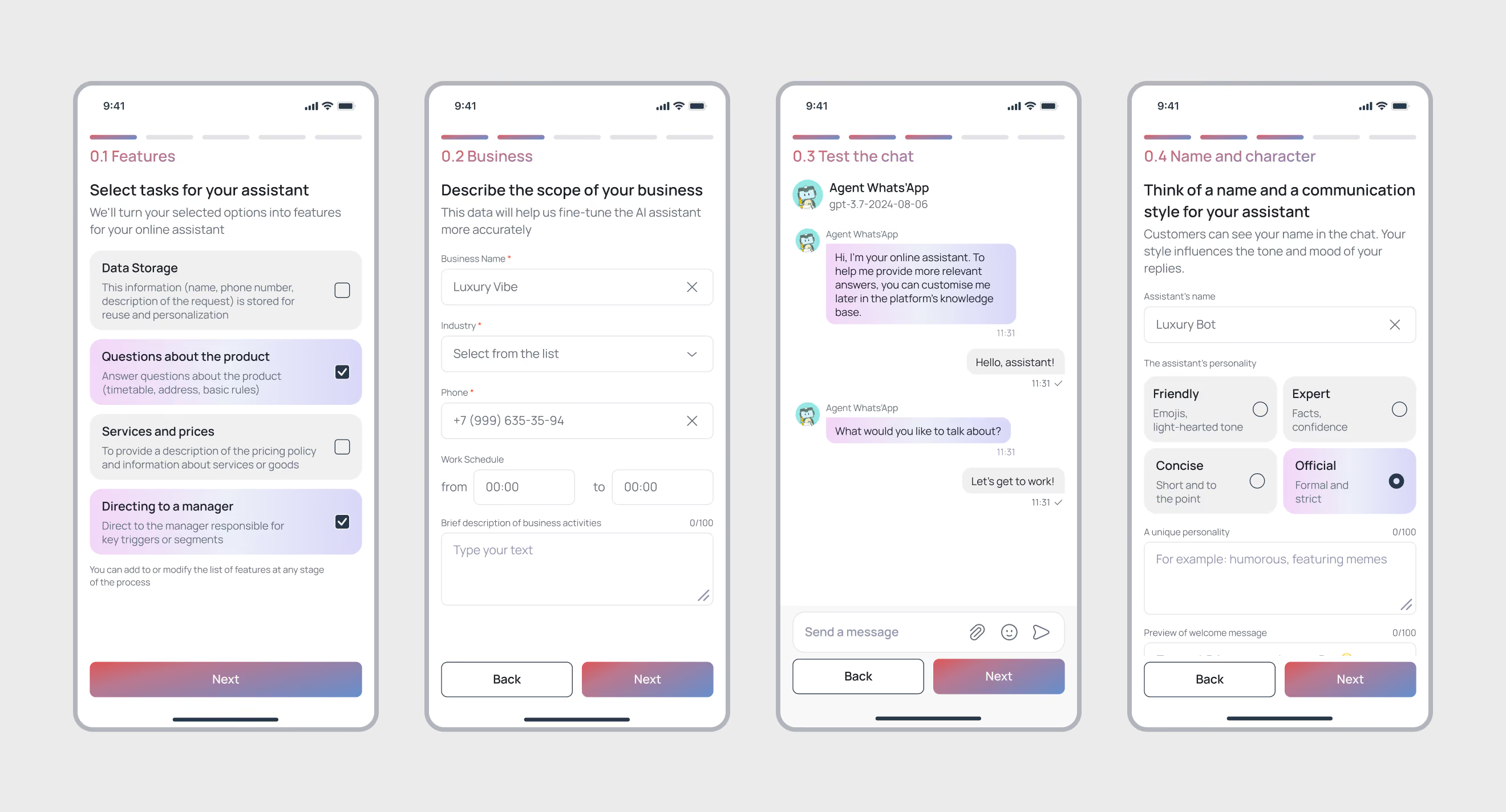
In the original version, the onboarding process consisted of 9 screens and required users to fill out a large amount of information before their first interaction with the product. This increased setup time and created the risk of losing users early on.In the new version, the process has been streamlined to four steps.
All non-essential settings have been moved into the product, and the key “Aha Moment” now occurs in the third step, where the user gets the chance to test their AI assistant and see the results of their settings in real time.
• reducing the registration process from 9 to 4 steps;
• quickly entering key business information;
• selecting the bot’s personality and communication style;
• the ability to test the AI assistant before completing the setup;
• transferring advanced settings to the main product after registration;
Quickly launch the AI assistant without lengthy setup; see the product’s results right from the very first steps of getting acquainted with the platform; and start using the service in just a few minutes.
Increased onboarding conversion rates, a reduction in the number of users who abandon the product during registration, and faster achievement of key activation milestones
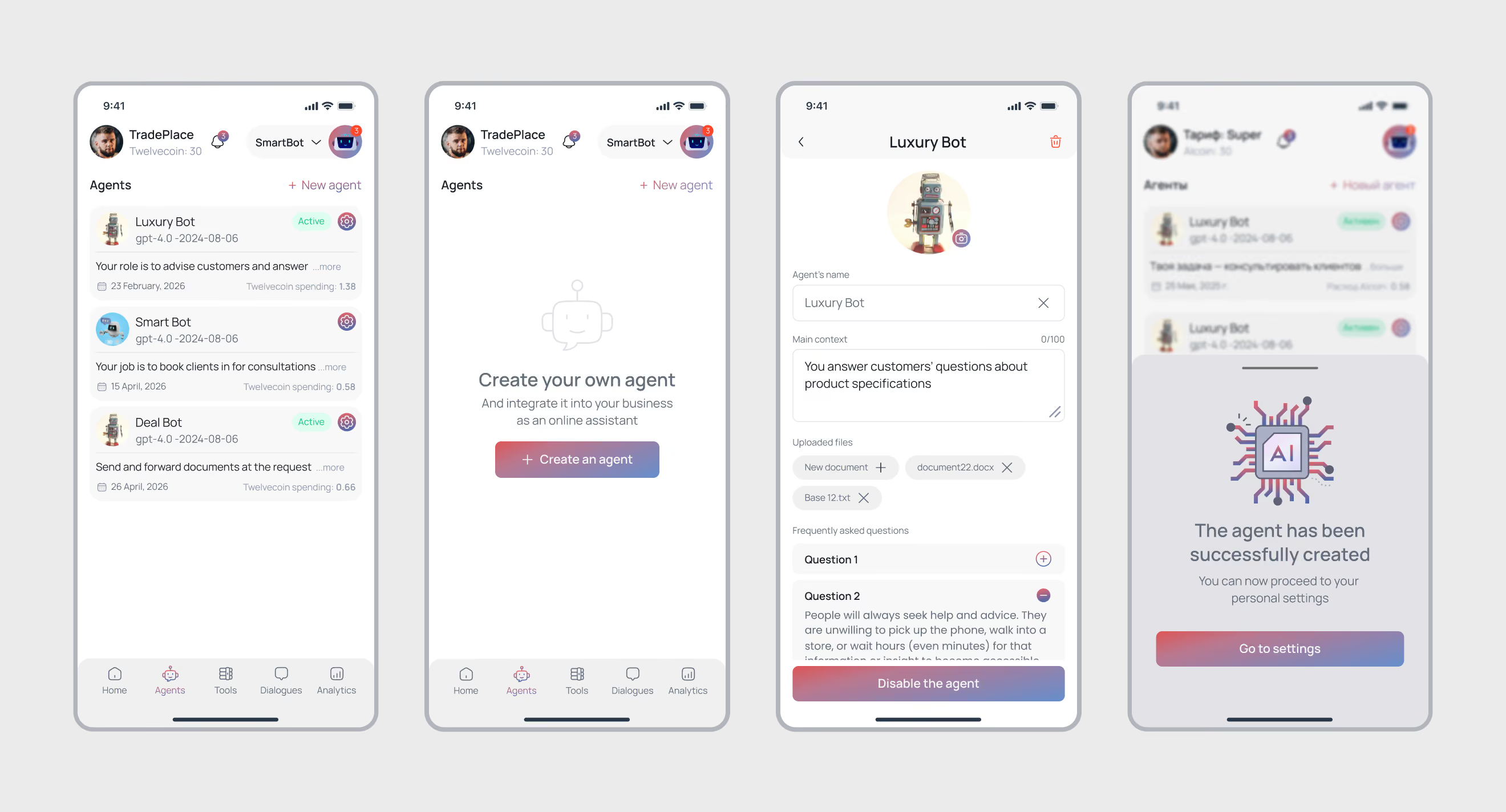
Designed an AI agent builder that helps businesses create specialised virtual assistants for various customer communication scenarios. The solution enables bots to be trained using a company’s internal data and adapted to specific tasks without complex technical configuration.
• configuration of context and business rules;
• support for multiple roles and use cases;
• training via questions and answers;
• creation of personalised AI agents.
the ability to independently configure and train AI assistants without technical knowledge, quickly adapting them to business tasks and changes in company processes
reduced AI implementation time, improved response accuracy, and the ability to quickly launch new digital assistants tailored to the company’s needs
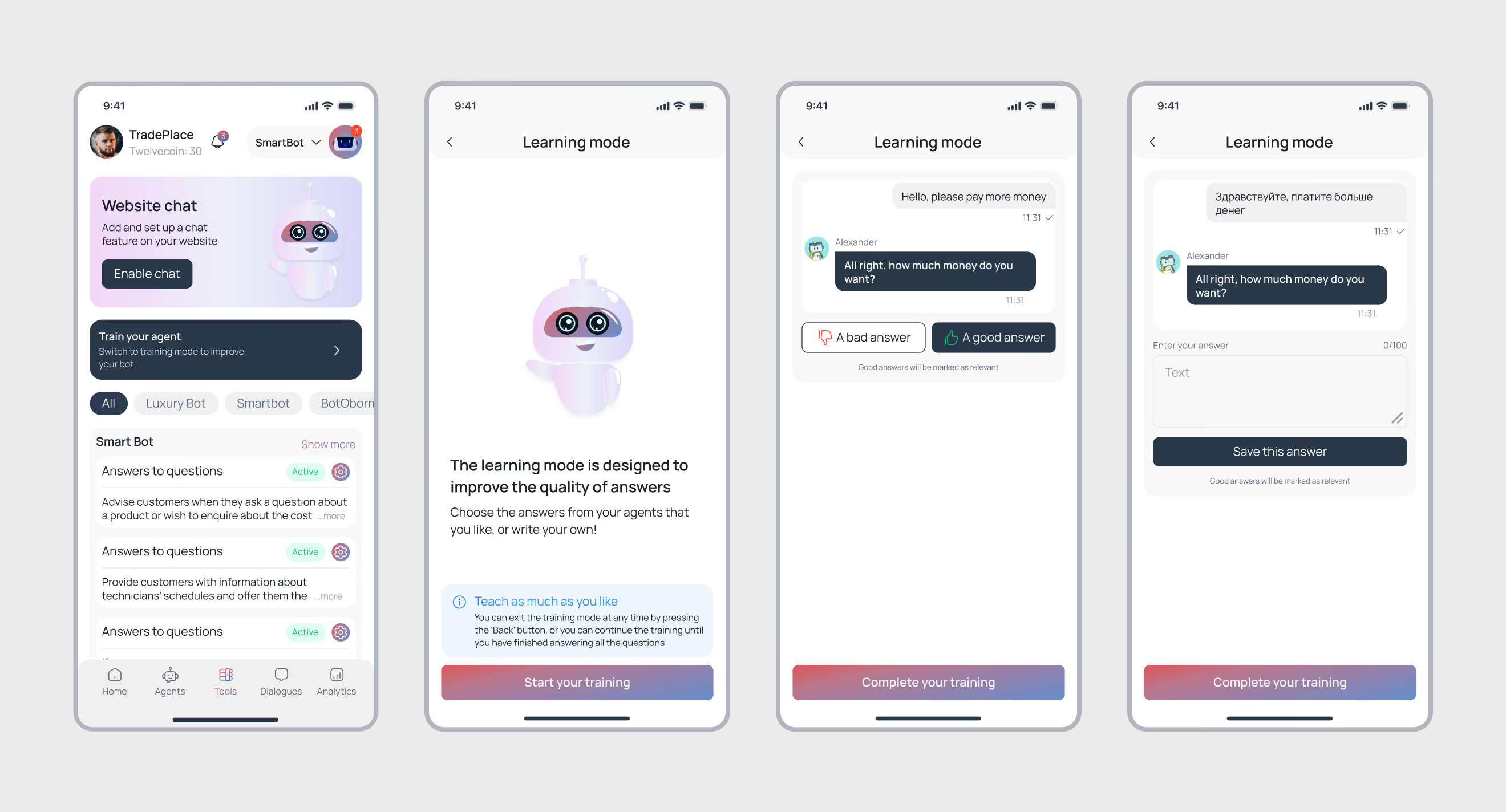
Designed a mechanism for the continuous training of AI agents based on real customer conversations. The system allows users to evaluate the bot’s responses, suggest better phrasing and gradually improve the quality of automated support without the need to involve machine learning specialists.
• replacing unsuccessful responses with correct alternatives;
• accumulating successful communication patterns;
• constantly improving the relevance of responses;
the AI becomes more useful and accurate with every interaction, reducing the time spent on manual handling of enquiries and improving the quality of customer service
reduced workload for support staff, increased efficiency of AI automation, and an improved customer experience through higher-quality and more consistent responses
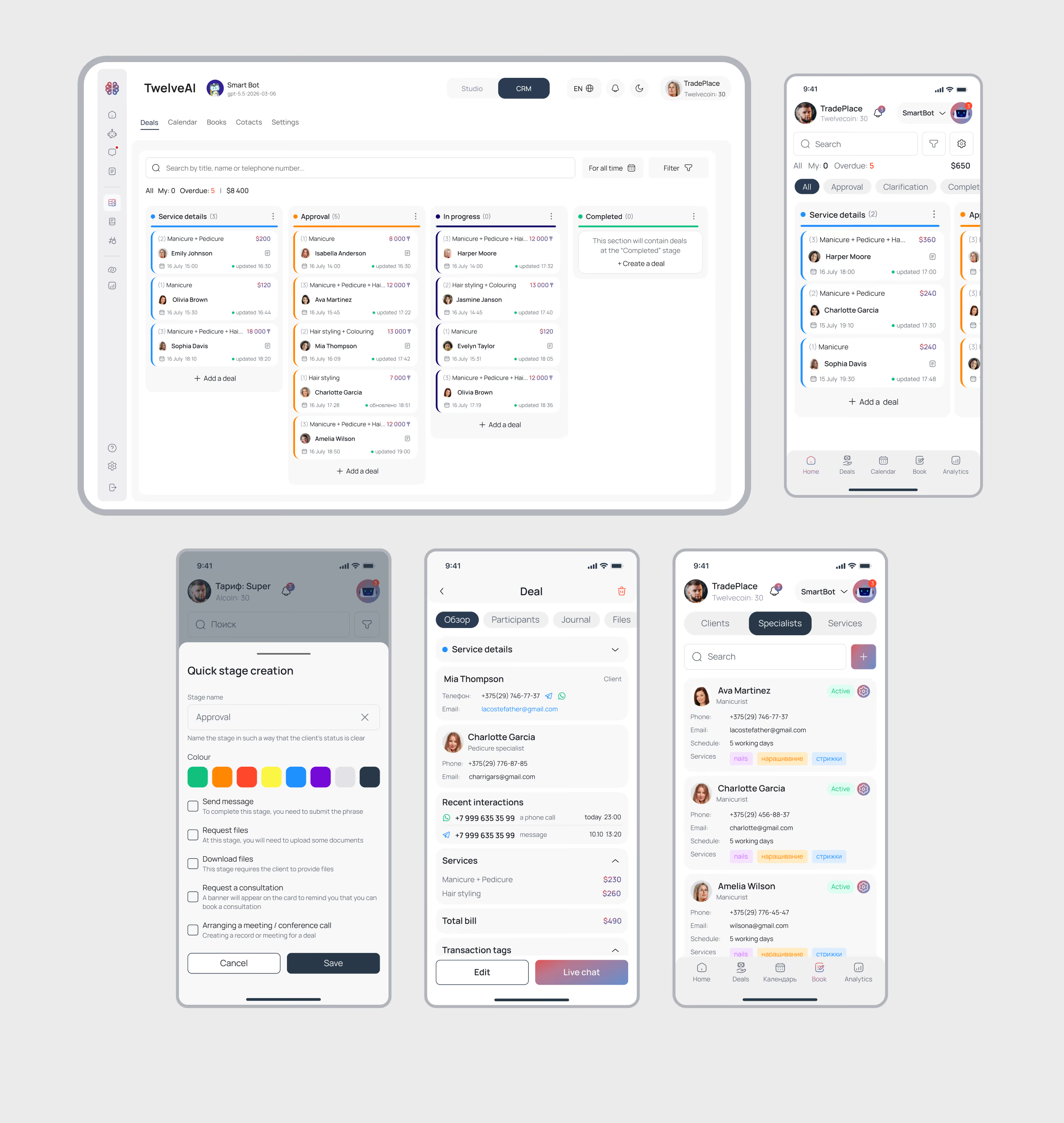
A CRM system that integrates customer communications, AI agent operations and sales processes within a single workspace. The platform helps teams process enquiries more quickly, manage deals and track customers’ progress through the sales funnel.
• collaboration between AI and managers within a single process;
• automatic synchronisation of enquiries from messaging apps;
• customer profiles with a complete history of interactions;
• configuration of deal stages and workflows;
• real-time sales funnel management.
quick access to all customer and deal information in one place, a reduction in routine tasks, and more convenient sales management regardless of the device used
increased lead conversion rates, reduced operational workload on the team, and the creation of a transparent sales process from initial contact to deal closure
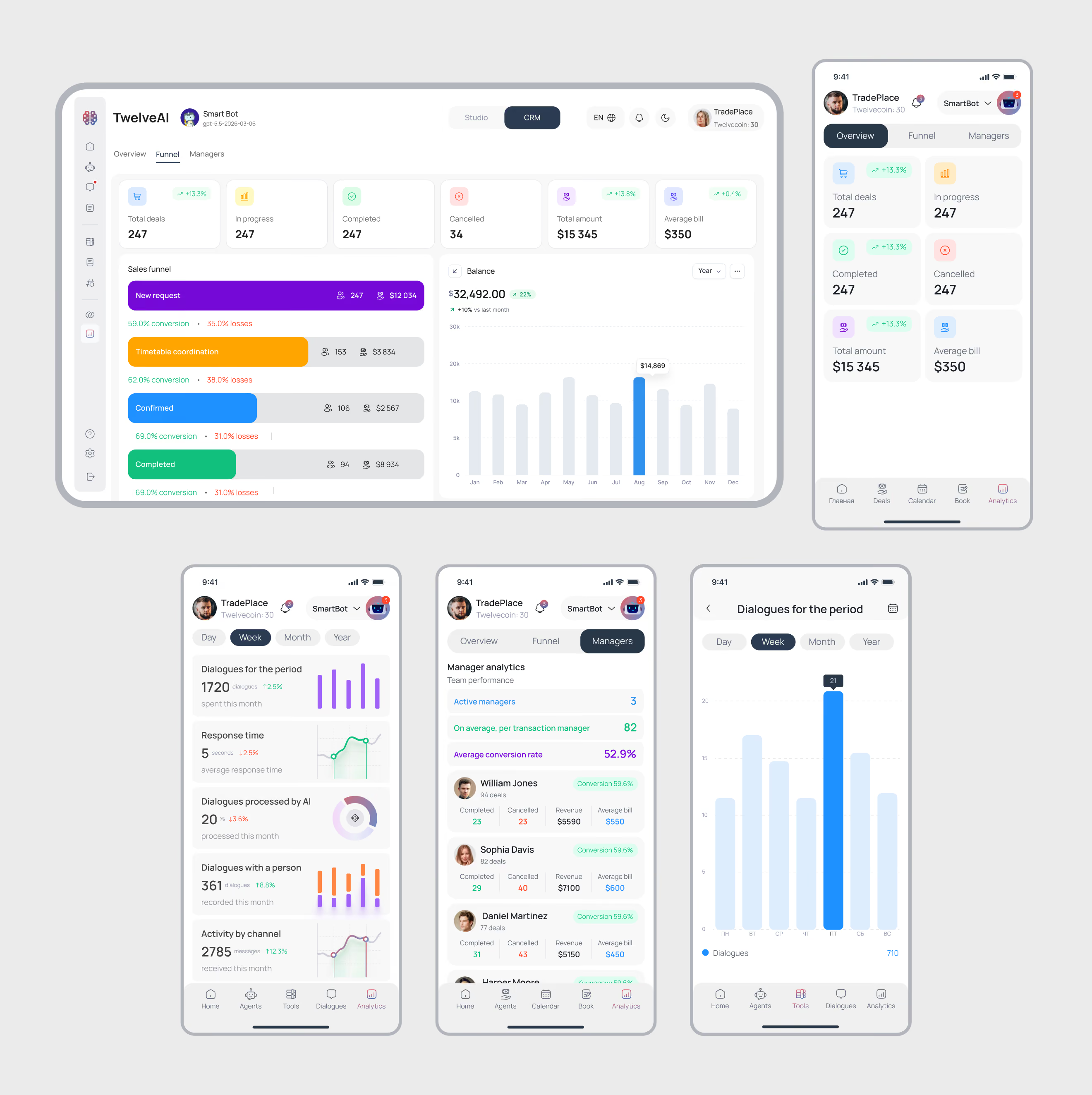
Designed an analytics centre that integrates data from CRM systems, AI agents and the sales team into a single business performance monitoring system
• assessment of AI effectiveness in handling enquiries;
• tracking of customer activity and response times;
• visualisation of financial and operational metrics;
• monitoring of managers’ performance;
the ability to quickly assess the state of the business, identify problem areas and make decisions based on up-to-date data without having to gather information from different systems
helps to measure the contribution of AI automation, optimise sales processes and make data-driven decisions
Onboarding Completion Rate:
+28%
Time to First Value:
65%
AI Automation Rate:
70%
• AI Lead Scoring: automatic lead quality assessment and conversion probability forecasting;
• AI Copilot for Sales Managers: recommendations on next steps and support for managers in managing deals;
• AI Performance Analytics: in-depth analysis of response quality, automation success rates and the effectiveness of AI agents.